C# 使用 TensorRtSharp4.0 运行 YOLOv8n 实例分割
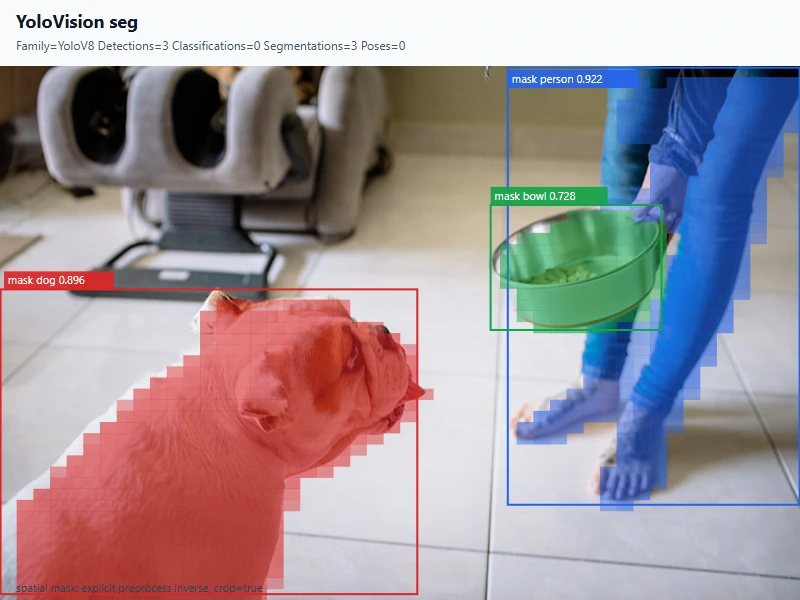
本文从空的 .NET 8 控制台项目开始,完整演示 YOLOv8n-seg 权重获取、ONNX 转换、公开 NuGet 包引用、图像预处理、TensorRT 执行、mask 解码和原图叠加。最终程序在一张真实图片中识别出 person、dog 和 bowl,并输出逐实例 mask、JSON 报告、标注图和真实运行页面。
本文仅执行本地开发验证。CUDA、cuDNN 和 TensorRT 由使用者安装;当前没有创建版本、Release 或发布包,模型也不进入 Git。
本文使用的项目与库
本流程使用 TensorRtSharp4.0 的公开包和仓库内应用:
| 包 | 职责 |
|---|---|
JYPPX.TensorRT.CSharp.API |
TensorRT/CUDA 托管接口、ONNX 加载、binding、显存和执行。 |
applications/YoloVision |
RGB letterbox、YOLOv8 detection 解码、prototype mask 合成、坐标还原和 SVG 输出。 |
JYPPX.TensorRT.CSharp.API.Runtime.win-x64.trt10.11.cuda12.9.cudnn9.22.Bridge |
只包含项目自己的 native bridge,不包含 CUDA、cuDNN 或 TensorRT。 |
本次验证环境为 NVIDIA GeForce RTX 3060 Laptop GPU、驱动 576.02、TensorRT 10.11.0、CUDA Toolkit 12.9 和 .NET SDK 10.0.301。消费者应根据自己安装的运行环境选择相同矩阵的 Bridge 包。
模型获取与许可证
权重来自 Ultralytics 官方 Release:
https://github.com/ultralytics/assets/releases/download/v8.3.0/yolov8n-seg.pt
来源固定到 ultralytics v8.3.0 和源码提交 6e43d1e1e5db72afbf686dee6745669bcb124b0a。权重长度为 7,071,756 字节,SHA256 为:
a7cd8f929e1903d78a12a48efecab430209f18dc46cb96c3599a5980c63c423c
先用仓库脚本获取并校验固定资产:
$repoRoot = Resolve-Path .
$workspaceRoot = Split-Path $repoRoot -Parent
$assetRoot = Join-Path $workspaceRoot 'downloads/yolov8n-seg-ultralytics-v8.3.0'

pwsh -NoProfile -ExecutionPolicy Bypass `
  -File (Join-Path $repoRoot 'eng/Acquire-YoloV8SegOfficialAssets.ps1') `
  -OutputRoot $assetRoot
演示图片独立于模型资产。使用一个环境变量指向本机已获准使用的素材目录,再复制并校验本文固定输入,避免在文章中暴露作者机器路径:
$demoImageRoot = $env:JYPPX_DEMO_IMAGE_ROOT
if ([string]::IsNullOrWhiteSpace($demoImageRoot)) {
  throw '请先设置 JYPPX_DEMO_IMAGE_ROOT,使其指向本机演示图片目录。'
}

$inputRoot = Join-Path $assetRoot 'input'
$inputJpeg = Join-Path $inputRoot 'dog.jpg'
New-Item -ItemType Directory -Force $inputRoot | Out-Null
Copy-Item (Join-Path $demoImageRoot 'dog.jpg') $inputJpeg -Force

$expectedImageSha256 = 'bf76876b90e3ebd521f9882b9177ba8f33e80cb7ec09c630f179b122edd125e1'
$actualImageSha256 = (Get-FileHash $inputJpeg -Algorithm SHA256).Hash.ToLowerInvariant()
if ($actualImageSha256 -ne $expectedImageSha256) {
  throw "dog.jpg SHA256 不匹配:$actualImageSha256"
}
权重许可证为 AGPL-3.0-only。模型分发需要使用者按实际业务自行复核,因此 .pt 和 ONNX 都留在仓库外。本文输入 dog.jpg 由项目所有者提供,并已明确授权用于本仓库技术文章;原图 SHA256 为 bf76876b90e3ebd521f9882b9177ba8f33e80cb7ec09c630f179b122edd125e1。
ONNX 转换与暂存
在隔离的 Python 环境中安装固定版 Ultralytics、PyTorch、ONNX 和 ONNX Runtime,然后执行:
$Weights = Join-Path $assetRoot 'source/yolov8n-seg.pt'
$modelRoot = Join-Path $workspaceRoot 'models/YoloVision/InstanceSegmentation/yolov8n-seg-ultralytics-v8.3.0'
New-Item -ItemType Directory -Force $modelRoot | Out-Null

yolo export model=$Weights format=onnx imgsz=640 opset=17 simplify=True dynamic=False batch=1 device=cpu
Move-Item (Join-Path (Split-Path $Weights) 'yolov8n-seg.onnx') $modelRoot -Force
转换模型暂存在 models/YoloVision/InstanceSegmentation/yolov8n-seg-ultralytics-v8.3.0/yolov8n-seg.onnx,不会上传当前 GitHub 仓库。文件长度为 13,873,432 字节,SHA256 为:
08b5c61368d4ddec5e647522fc55a93c42a9e0c581770aae48b87bba65a9b21d
模型合同包含两路输出:
images : float32[1,3,640,640]
output0: float32[1,116,8400]   # 4 box + 80 class + 32 mask coefficients
output1: float32[1,32,160,160] # mask prototypes
把已获准使用的原图转换为 P6 RGB PPM,原 JPEG 继续作为结果图背景:
$inputPpm = Join-Path $assetRoot 'derived/dog.ppm'
New-Item -ItemType Directory -Force (Split-Path $inputPpm) | Out-Null
& $env:JYPPX_YOLO_PYTHON -c "from PIL import Image; import sys; Image.open(sys.argv[1]).convert('RGB').save(sys.argv[2], format='PPM')" $inputJpeg $inputPpm
YoloVision 首次运行只生成 C# 预处理 tensor。随后参考脚本读取这个完全相同的 tensor,用 ONNX Runtime CPU 生成两路 raw reference:
$artifactRoot = Join-Path $workspaceRoot 'downloads/article-assets/yolovision-yolov8n-seg'
$model = Join-Path $modelRoot 'yolov8n-seg.onnx'
$tensor = Join-Path $artifactRoot 'seg-csharp-input.fp32.bin'

& $env:JYPPX_YOLO_PYTHON `
  (Join-Path $repoRoot 'eng/Invoke-YoloVisionSegmentationReference.py') `
  --model $Weights --image $inputJpeg `
  --onnx-model $model --input-tensor $tensor `
  --output-directory (Join-Path $artifactRoot 'reference') `
  --evidence-classification source-tree-runtime
脚本会严格检查 CPU provider、tensor 名称、shape 和 finite 值,并写出 output0.reference.json、output1.reference.json 及独立 Ultralytics/PyTorch mask 参考。
使用公开包准备应用
applications/YoloVision 是完整应用并设置为 IsPackable=false。它通过共享 props 引用已发布的
JYPPX.TensorRT.CSharp.API 4 系列包,以及作者维护的
OpenCV-CSharp-API。应用本身不发布 YoloVision 案例 NuGet 包。
新建仓库外项目时,可以让 NuGet 获取当前公开预览版,而不在文章中写死具体版本:
dotnet add package JYPPX.TensorRT.CSharp.API --version "4.0.0-*"
dotnet add package JYPPX.OpenCV.CSharp.API --prerelease
dotnet add package JYPPX.OpenCV.runtime.win-x64 --prerelease
dotnet add package JYPPX.TensorRT.CSharp.API.Runtime.win-x64.trt10.11.cuda12.9.cudnn9.22.Bridge --version "4.0.0-*"
4.0.0-* 只跟随当前 4.0.0 预览线,避免误选 API 不兼容的历史 4.0.6170。最后一个包 ID 必须按目标机器环境替换。它只包含项目自有 bridge;CUDA、cuDNN、TensorRT 和 NVRTC
继续由用户安装。仓库中的 YoloVision 项目直接运行当前源码,但 TensorRT/CUDA API 来自公开 NuGet 包。
编写程序入口
Program.cs 直接复用 YoloVision 的无指针入口:
using YoloVisionSample;

return YoloVisionCommand.Run(args);
两路输出的角色必须显式指定为 output0:det,output1:mask-prototypes。mask-coefficient-count=32 必须与 detection 行尾部系数数量一致,否则 prototype 合成没有确定含义。
编译并运行
还原并编译使用公开包的 YoloVision 应用:
dotnet restore ./applications/YoloVision/YoloVision.csproj
dotnet build ./applications/YoloVision/YoloVision.csproj -c Release --no-restore
执行 TensorRT 推理、全量 raw 输出比较、mask 导出和可视化:
$labels = Join-Path $assetRoot 'derived/coco.names'
$reference0 = Join-Path $artifactRoot 'reference/output0.reference.json'
$reference1 = Join-Path $artifactRoot 'reference/output1.reference.json'
$maskRoot = Join-Path $artifactRoot 'segmentation-masks'
$resultJson = Join-Path $artifactRoot 'seg-output.json'
$resultSvg = Join-Path $artifactRoot 'seg-annotated.svg'
$env:JYPPX_TENSORRT_ROOT = $env:TENSORRT_PATH

dotnet run --project ./applications/YoloVision -c Release --no-build -- `
  --model $model --labels $labels --image $inputPpm `
  --preprocessed-output $tensor --input-shape 1x3x640x640 `
  --tensor-rt-line 10 --family v8 --task seg `
  --output-role-map output0:det,output1:mask-prototypes `
  --mask-coefficient-count 32 --confidence 0.25 --iou-threshold 0.45 --top-k 10 `
  --mask-threshold 0.5 --mask-spatial-transform `
  --mask-coordinate-space model-input --mask-crop-to-box true `
  --reference-outputs "output0:$reference0,output1:$reference1" `
  --reference-abs-tolerance 0.02 --reference-rel-tolerance 0.03 `
  --reference-nan-policy reject --reference-infinity-policy exact --noTF32 `
  --segmentation-mask-output-directory $maskRoot `
  --output-json $resultJson --visualization $resultSvg `
  --visualization-background $inputJpeg
TensorRT 完成后,把 mask manifest 交给同一参考脚本完成独立后处理比较:
& $env:JYPPX_YOLO_PYTHON `
  (Join-Path $repoRoot 'eng/Invoke-YoloVisionSegmentationReference.py') `
  --model $Weights --image $inputJpeg `
  --output-directory (Join-Path $artifactRoot 'independent-postprocess') `
  --actual-manifest (Join-Path $maskRoot 'segmentation-mask-artifacts.manifest.json') `
  --minimum-box-iou 0.995 --minimum-mask-iou 0.96 `
  --evidence-classification source-tree-runtime
已验证结果
实例框与半透明 mask 已经恢复到 800x534 原图坐标:
程序运行页面如下。终端截图来自本次真实运行的 stdout,仅用变量替换了工作区路径,所有 tensor 数量、误差和预测分数保持原样:
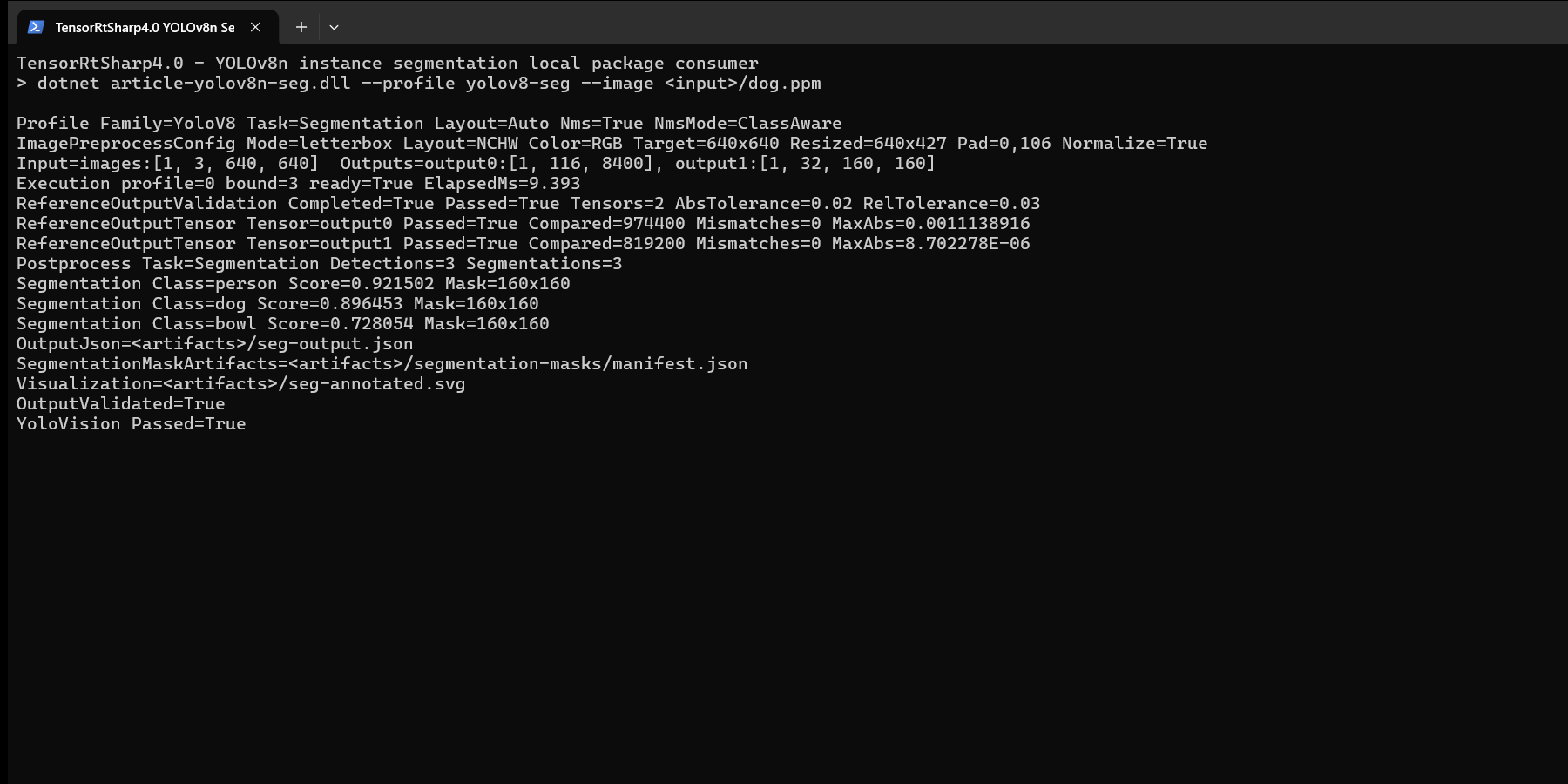
两张图都来自同一次真实 TensorRT 执行:第一张由该次执行写出的 SVG 渲染,第二张是同一次执行的 Windows Terminal 页面。
| 项目 | 实测值 |
|---|---|
| TensorRT 退出码 | 0 |
| C# 输入 tensor | 1,228,800 个 float32,SHA256 4a2fb58684705e2029f4fae3620ebd3e12e99c73b825fe5d5c89185f1a08c600 |
| letterbox | 原图 800x534,缩放 640x427,padding 0,106 |
| raw 比较值 / mismatch | 1,793,600 / 0 |
| output0 最大绝对误差 | 0.0011138916 |
| output1 最大绝对误差 | 0.000008702278 |
| TensorRT 推理耗时 | 9.393 ms |
| 实例 | person 0.921502、dog 0.896453、bowl 0.728054 |
独立后处理比较结果如下:
| 类别 | box IoU | mask IoU |
|---|---|---|
| person | 0.999471 |
0.968968 |
| dog | 0.998638 |
0.983439 |
| bowl | 0.998047 |
0.964434 |
box 门槛为 0.995,mask 门槛为 0.96。mask 差异集中在阈值边缘,来源是 C# 抗锯齿缩放与 Ultralytics/OpenCV 插值的边界像素差异;三类均通过,并且两路 raw tensor 已先完成零 mismatch 对照。
复查与边界
发布前 local-feed 证据复核
本文已经证明:官方 YOLOv8n-seg 权重可以固定获取并转换;ONNX 按要求暂存在外层 models;仓库外消费者可以使用公开 managed/bridge 包;C# tensor 同时驱动 TensorRT 和 ONNX Runtime;两路 raw 输出、实例框、mask 二进制、原图叠加和独立 PyTorch 结果能够互相追溯。
证据清单位于 samples/assets/yolovision-yolov8n-seg-article-runtime-evidence.json 和 samples/assets/yolovision-yolov8n-seg-article-visual-assets.json。既有本地包 runner 还验证了单值 raw reference 篡改与 mask 单字节篡改都会非零退出。
本文主流程使用公开包;既有 runner、截图和 JSON 仍保持发布前 local-feed 分类,不自动晋级为 package-consumer-runtime、post-publish、Owner acceptance 或 Release 证明。模型、tensor、raw reference、mask、日志和中间 SVG 留在 Git 外部;Git 只保存文章、经所有者授权的两张派生 PNG 和哈希记录。本文没有发布或上传任何包,也没有把 NVIDIA 运行库打包。
对应机器可读边界保持 publicPackageProof=false、postPublishProof=false、ownerReleaseAcceptance=false、releaseProof=false、performsPublish=false 和 uploadsAssets=false。